hq-json: A streaming JSON processor inspired by jq, with a lens-based query language.
hq is a JSON processor inspired by jq. It queries JSON with optics and rewrites values with transformations, streaming input so large documents never load fully into memory.
[Skip to Readme]

Modules
[Index] [Quick Jump]
Flags
Manual Flags
| Name | Description | Default |
|---|---|---|
| dev | Treat warnings as errors during development | Disabled |
Use -f <flag> to enable a flag, or -f -<flag> to disable that flag. More info
Downloads
- hq-json-0.1.2.tar.gz [browse] (Cabal source package)
- Package description (as included in the package)
Maintainer's Corner
For package maintainers and hackage trustees
Candidates
- No Candidates
| Versions [RSS] | 0.1.1, 0.1.2 |
|---|---|
| Dependencies | aeson (>=2.2.4 && <2.3), base (>=4.19 && <4.23), bytestring (>=0.11 && <0.13), file-embed (>=0.0.16 && <0.1), hq-json, megaparsec (>=9.7 && <9.8), optparse-applicative (>=0.18.1 && <0.19), parser-combinators (>=1.3.1 && <1.4), relude (>=1.2.2 && <1.3), scientific (>=0.3.8 && <0.4), streaming (>=0.2.4 && <0.3), text (>=2.0 && <2.2), vector (>=0.13.2 && <0.14) [details] |
| Tested with | ghc ==9.8.4, ghc ==9.10.3 |
| License | MIT |
| Copyright | Damian Franco Alvarez, 2026 |
| Author | damianfral <huevofritopamojarpan@gmail.com> |
| Maintainer | damianfral <huevofritopamojarpan@gmail.com> |
| Uploaded | by damianfral at 2026-10-18T23:13:07Z |
| Category | json, cli, optics, streaming, data-processing, tools |
| Home page | https://github.com/damianfral/hq#readme |
| Bug tracker | https://github.com/damianfral/hq/issues |
| Source repo | head: git clone https://github.com/damianfral/hq |
| Distributions | |
| Executables | hq |
| Downloads | 7 total (7 in the last 30 days) |
| Rating | (no votes yet) [estimated by Bayesian average] |
| Your Rating | |
| Status | Docs uploaded by user Build status unknown [no reports yet] |
Readme for hq-json-0.1.2
[back to package description]hq
hq is a JSON processor inspired by jq. It queries JSON with optics and
rewrites values with transformations, streaming input so large documents
never load fully into memory.
Usage
hq [OPTIONS] COMMAND OPTIC [ARGS] < input.json
hq v0.1.2

Usage: hq [-f|--file FILE] [-r|--raw] [-c|--compact] [-j|--join] COMMAND

  Query JSON using optics

Available options:
  -f,--file FILE           Input JSON file, or '-' for stdin
  -r,--raw                 Print strings without JSON quotes
  -c,--compact             Print compact JSON
  -j,--join                Print without separators
  -h,--help                Show this help text

Available commands:
  fold
  preview
  set
  over
  delete
Commands
Optics are used with different queries:
| Command | Meaning |
|---|---|
fold OPTIC |
Print every focused value, one per line. |
preview OPTIC |
Print at most the first focused value. |
set OPTIC VALUE |
Replace each focus with VALUE. |
over OPTIC TRANSFORMATION |
Rewrite each focused value in place. |
delete OPTIC |
Remove each focused value. |
preview accepts any optic and prints its first focus in document
order, stopping input there; it is fold capped at one value.
set takes a JSON literal and
is over with a constant transformation. over fails the whole query
when a focused value rejects the transformation (adding to a string,
for example). Deleting a missing field, or an empty focus, leaves the
input unchanged.
Input may hold any number of whitespace-separated JSON values
(JSON-lines style); every command except preview processes each
top-level value in turn.
Optic language
Optics select and traverse JSON values. Optics are composed with .;
each component focuses on a new set of values. Spaces around . are
optional, so @a.each.@b means @a . each . @b. Parentheses group
explicitly: (@a . each) . @b.
An optic may focus on nothing at all (a missing field, a value of the
wrong shape, an out-of-bounds ix); such focuses simply select no
values. Rewriting through keys renames object members.
| Optic | Meaning |
|---|---|
@field |
Focus the "field" member of an object. |
each |
Focus every element of an array, or every value of an object. |
keys |
Focus every object key, as a string. |
values |
Focus every value of an object. For arrays use each or ix. |
id |
Focus the whole value unchanged (the unit of .). |
_String |
Focus the value only if it is a string, and nothing otherwise. |
_Number |
Focus the value only if it is a number, and nothing otherwise. |
_Bool |
Focus the value only if it is a boolean, and nothing otherwise. |
_Null |
Focus the value only if it is null, and nothing otherwise. |
_Array |
Focus the value only if it is an array, and nothing otherwise. |
_Object |
Focus the value only if it is an object, and nothing otherwise. |
_Just |
Focus any non-null value. |
ix N |
Focus array element N (0-based). |
A . B |
Composition: focus A, then B within each target. |
filter OPTIC TRANSFORMATION
Keep the input when TRANSFORMATION maps some value focused by OPTIC
to true, and focus on nothing otherwise. The transformation must
produce a boolean.
Single atoms stay bare:
filter @age == 30
Anything longer takes its own paren group per side:
filter (each . @age) (== 30)
A . after a bare optic starts an outer composition, so a dotted optic
inside filter needs its sides parenthesized:
each . filter (@tags . each) (== "x")
Examples:
@name: Focus the"name"field.@users . each . @name: Focus the"name"field of every element in"users".@users . each . @age: Focus the"age"field of every element in"users".each . _Number: Focus every number inside an array.@a . ix 1: Focus the second element of the array in"a".
Transformations
Transformations describe how a focused value is rewritten. They apply
to one value at a time and compose right-to-left with .: in A . B,
B runs first and A runs over its result. So + 1 . * 2 doubles
first, then adds one.
Operators bind tightest at the atoms, then ., then and/&&, then
xor/^^, then or/|| loosest. Parentheses override:
(== "x") or (== "hi").
Numbers (input and output are numbers)
| Transformation | Meaning |
|---|---|
+ N |
Add N. Example: + 1. |
* N |
Multiply by N. Example: * 2. |
- N |
Subtract N. Example: - 1. |
Comparisons (input is a number, output is a boolean)
| Transformation | Meaning |
|---|---|
< N |
Test whether the value is less than N. Example: < 30. |
<= N |
Test whether the value is at most N. Example: <= 30. |
> N |
Test whether the value is greater than N. Sugar for not . <= N. |
>= N |
Test whether the value is at least N. Sugar for not . < N. |
Strings (input is a string)
| Transformation | Meaning |
|---|---|
++ "s" |
Append s. Example: ++ "!". |
trim |
Strip surrounding whitespace. |
replace "a" "b" |
Replace occurrences of a with b. |
stripPrefix "p" |
Remove the prefix when present. |
stripSuffix "s" |
Remove the suffix when present. |
isPrefixOf "p" |
Test whether the value starts with p. |
isSuffixOf "s" |
Test whether the value ends with s. |
isInfixOf "i" |
Test whether the value contains i. |
stripPrefix and stripSuffix leave the value unchanged when the
affix is absent. The is* tests yield a boolean.
Arrays (input is an array)
| Transformation | Meaning |
|---|---|
concat [...] |
Append the given elements. Example: concat [3, 4]. |
reverse |
Reverse the elements. |
unique |
Drop duplicates, keeping first occurrences. |
sort |
Sort (canonical order): null, bools, nums, strings, arrays, objs. |
length |
Element count, as a number. |
isEmpty |
Test whether the array is empty, yielding a boolean. |
Objects (input is an object)
| Transformation | Meaning |
|---|---|
merge {...} |
Shallow-merge the operand into the value (operand has pref). |
deepMerge {...} |
Recursively merge the operand into the value. |
Any value
| Transformation | Meaning |
|---|---|
== VALUE (or = VALUE) |
Test equality with a JSON literal. |
const VALUE |
Replace with VALUE. |
Equality examples: == 30, == "hi", == true. set is over
with const.
Booleans (inputs are booleans, outputs are booleans)
| Transformation | Meaning |
|---|---|
not |
Negate the value. |
A or B (or A || B) |
Disjunction; B runs only when A is false. |
A and B (or A && B) |
Conjunction; B runs only when A is true. |
A xor B (or A ^^ B) |
Exclusive disjunction. |
A . B |
Composition: apply B first, then A over its result. |
For example:
hq over '@users . each . @age' '+ 1'
increments every user's age, and
hq over '@users . each . @name' 'stripPrefix "dr. "'
strips the prefix from every user's name when present.
Static checks
Queries are checked before running. Steps that cannot work are rejected up front instead of failing mid-stream:
/ 0is rejected: division by zero.- A transformation applied where it cannot fit is rejected:
over 'each._Number' '++ "x"'fails because the optic focuses numbers and the transformation needs a string. Optics without a pinned shape (@field,each,ix) focus values of unknown type and accept anything; only prisms (andkeys) narrow the focus, so only provable mismatches are reported. filterpredicates must produce booleans, and accept their sub-optic's focus type.
Examples
echo '{"name":"ada","score":96}' | hq fold '@name'
# "ada"

echo '{"name":"ada"}' | hq fold '@name' -r
# ada (raw: strings print without quotes)

echo '{"a":[1,2,3]}' | hq fold '@a . each'
# 1, 2, 3 (one per line)

echo '[{"a":90},{"a":96}]' | hq fold 'each . filter (@a) (== 90)' -c
# [{"a":90}]

echo '{"a":1}' | hq over '@a' '+ 1' -c
# {"a":2}

echo '{"a":1,"b":2}' | hq set '@b' '3' -c
# {"a":1,"b":3}

echo '{"a":1,"b":2}' | hq delete '@b' -c
# {"a":1}

# nix
nix build . --json \
  | hq -r fold 'each . @outputs . values' \
  | cachix push my-cachix-cache

# Kubernetes
kubectl get pods -o json \
  | hq -r fold '@items . each . @metadata . @name'

# ffmpeg
ffprobe -v quiet -print_format json -show_streams video.mp4 \
  | hq -r fold 'each . @codec_name'

# Github
curl -s https://api.github.com/repos/damianfral/hq \
  | hq -r fold '@topics.each'
Performance
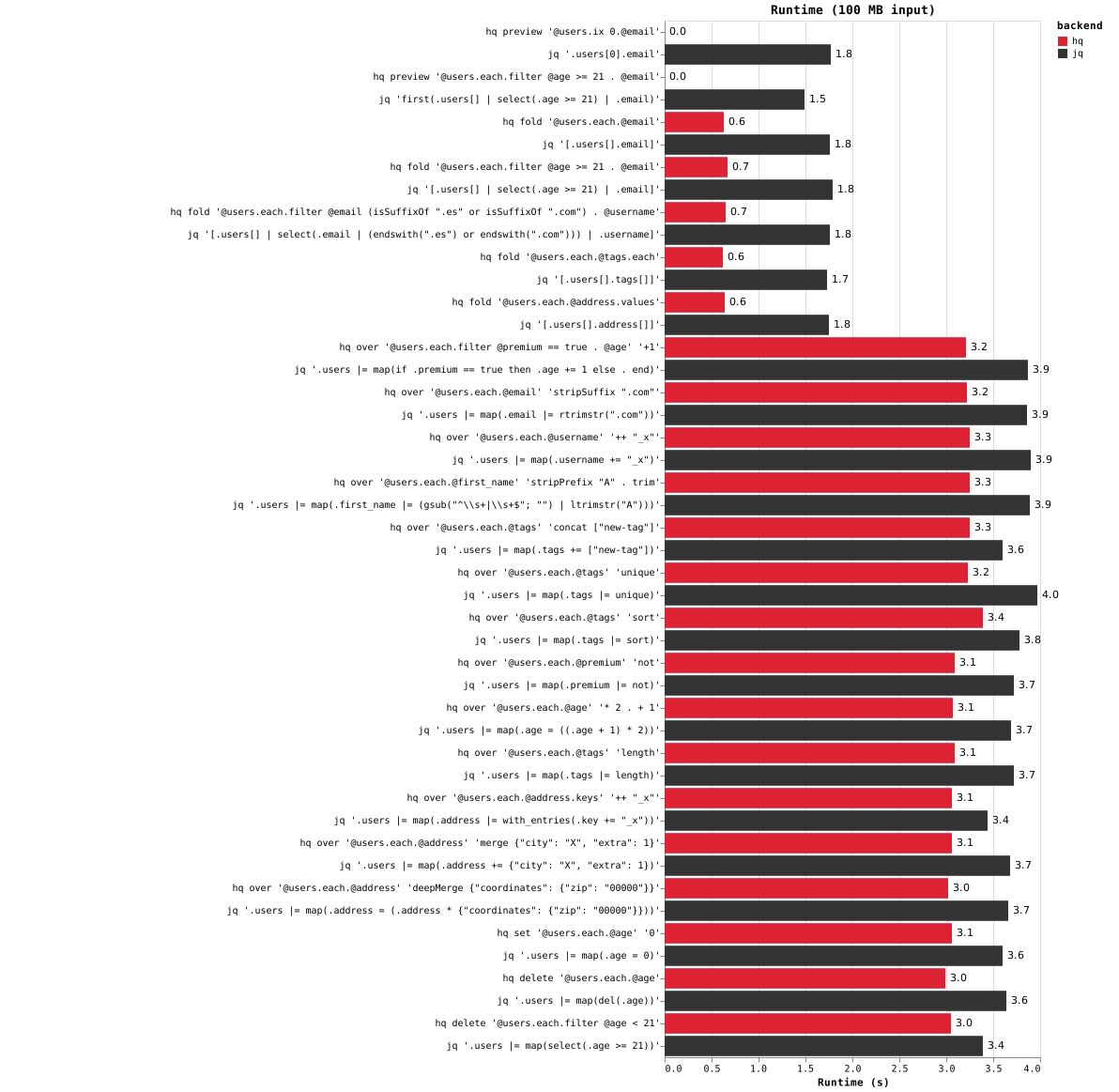
On the 100 MB hq-bench-data benchmark (bench/bench.sh), fold runs about 3x faster than jq, while over/set/delete perform around 1.2x faster.
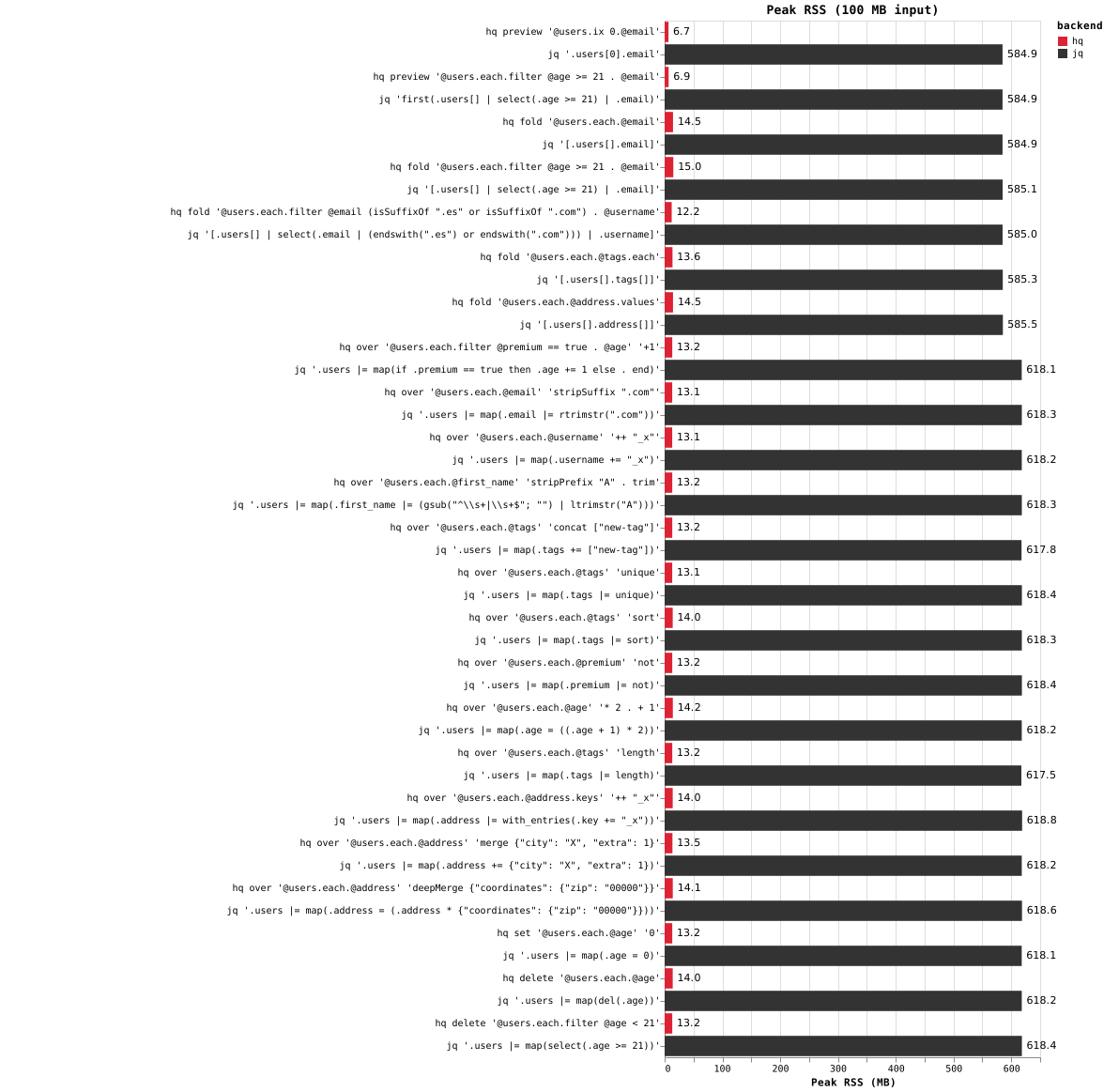
hq streams the input without materializing the document, keeping peak RSS at ~14MB versus ~600 MB for jq.