hooky: A minimal git hooks manager


Modules
- Hooky
- Hooky.Config
- Hooky.Error
- Internal
- Hooky.Internal.GitFile
- Hooky.Internal.Logging
- Hooky.Internal.Messages
- Hooky.Internal.Output
- Hooky.Internal.Temp
- Hooky.Lint
- Hooky.Run
- Utils
- Hooky.Utils.Git
- Hooky.Utils.Glob
- Hooky.Utils.OsPath
- Hooky.Utils.Process
- Hooky.Utils.Term
- Hooky.Utils.Text
Downloads
- hooky-1.0.9.tar.gz [browse] (Cabal source package)
- Package description (as included in the package)
Maintainer's Corner
For package maintainers and hackage trustees
Candidates
- No Candidates
| Versions [RSS] | 1.0.9 |
|---|---|
| Change log | CHANGELOG.md |
| Dependencies | ansi-terminal, base (<5), bytestring, concurrent-output, containers, deepseq, directory, file-io, filepath, Glob, hooky, kdl-hs (>=1.1.0), optparse-applicative, os-string, process, scientific, text, time, unliftio [details] |
| License | BSD-3-Clause |
| Author | Brandon Chinn <brandonchinn178@gmail.com> |
| Maintainer | Brandon Chinn <brandonchinn178@gmail.com> |
| Uploaded | by brandonchinn178 at 2026-11-27T22:40:57Z |
| Category | Tools |
| Home page | https://github.com/brandonchinn178/hooky#readme |
| Bug tracker | https://github.com/brandonchinn178/hooky/issues |
| Source repo | head: git clone https://github.com/brandonchinn178/hooky |
| Distributions | |
| Executables | hooky |
| Downloads | 3 total (3 in the last 30 days) |
| Rating | (no votes yet) [estimated by Bayesian average] |
| Your Rating | |
| Status | Docs not available [build log] All reported builds failed as of 2026-11-28 [all 2 reports] |
Readme for hooky-1.0.9
[back to package description]Hooky
Minimal git hooks manager.
Features:
- Only runs on staged files
- Supports partially staged and untracked files
- Hooks run in parallel
- Built-in support for auto-fixing files
- Show stdout while hook is in-progress
- Support for passing files to hooks via response files
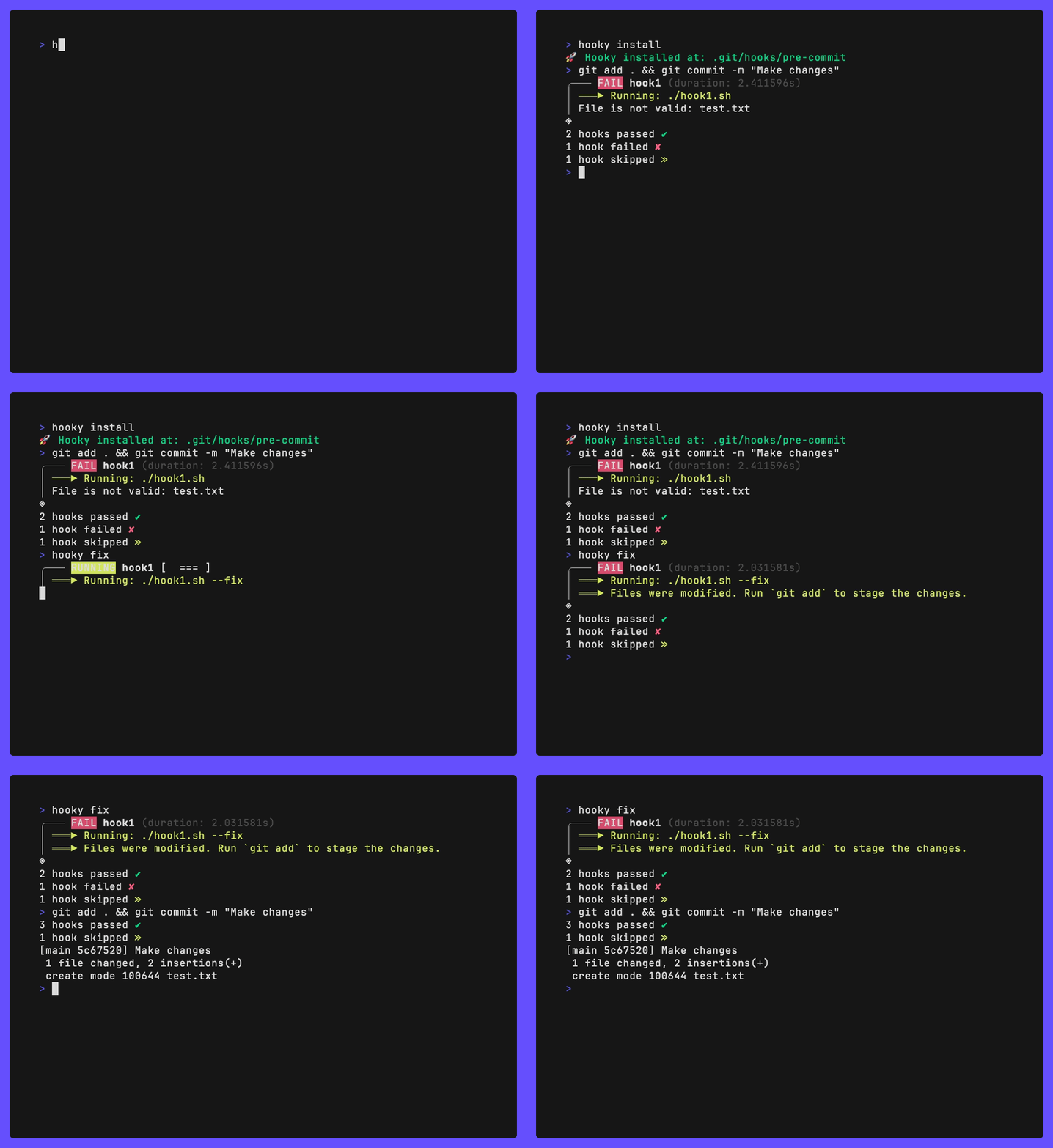
Installation
With Homebrew
brew install brandonchinn178/tap/hooky
With Nix
nix profile install nixpkgs#hooky
GitHub release
Download the appropriate binary from the GitHub releases page.
Usage
-
hooky install [--mode MODE] [--format FORMAT]- Registers
hookywith git hooks. --modedetermines what to do when hooks modify files:check(default) - Run the commands incheckmode, which shouldn't modify filesfix- Run the commands infixmode, which may modify filesfix-add- Same asfix, except add the changes to the stage and continue the commit
--formatdetermines how to format the output:minimal(default) - Only show full stdout of failed hooks.full- Show passed/skipped hooks, without their stdout. Include durations for all hooks.verbose- Show full stdout + duration of all hooks.
- Configure defaults with the Global configuration
- Registers
-
hooky run [FILES ...] [-k HOOK]- Manually runs the given hooks in
checkmode - Files may be specified as
@foo.txt, wherefoo.txtcontains one file per line. - Shortcuts:
--modified/-m=@<(git diff --name-only --diff-filter=AMR)--staged/-s=@<(git diff --staged --name-only --diff-filter=AMR)--all/-a=@<(git ls-files)--prev/-1=@<(git diff HEAD~1..HEAD --name-only --diff-filter=AMR)
--stashstashes all unstaged changes before running- If no files are specified, equivalent to
--stash --staged -kmay be specified multiple times, specifying the hooks to run
- Manually runs the given hooks in
-
hooky fix [FILES ...] [-k HOOK]- Same as
hooky run, except runs infixmode
- Same as
.hooky.kdl configuration
Configuration is specified with the KDL language.
Each hook is specified in a hook section:
hook name_of_hook {
    command my_formatter arg0 arg1 {
        check_args --mode check
        fix_args --mode fix
        pass_files file
    }
    files *.py *.txt
}
command: The command to run- You're responsible for installing the necessary tools. dotslash is a good way to automatically install binary tools.
- Can be written without quotes, but quotes are needed if special characters like
/or spaces are used
check_args: Additional arguments to pass when running incheckmodefix_args: Additional arguments to pass when running infixmodepass_files: How to pass files to the commandxargs(default) - Pass files toxargs, which will batch executexargs_parallel- Same asxargs, except run in parallelfile- Put files into a file (one file per line) and pass the list as an argument as@path/to/file.txtnone- Don't pass files to the command at all
files: Globs of files that should trigger the hook- See File globs for supported syntax
- Globs may be specified as arguments or lists:
files *.hs *.txt files { - *.hs - *.txt } - When multiple globs are specified, a file matches if:
- Any positive globs match, AND
- All negative globs don't match
You may also specify defaults in the defaults section. Available options are documented below:
defaults {
    // Any globs specified here are inherited by all hooks
    files *.py
}
File globs
File globs are represented as KDL strings supporting the following syntax:
*matches any character except/**matches zero or more directories- e.g.
a/**/*.txtmatchesa/foo.txtanda/b/foo.txtbut notb/foo.txt
- e.g.
- Relative paths match anywhere in the repo
- e.g.
*.txtmatchesfoo.txtandfoo/bar.txt - In other words,
**/is auto-prepended to the beginning
- e.g.
- Absolute paths match from the root of the repo
- e.g.
/*.txtmatchesfoo.txtbut notfoo/bar.txt
- e.g.
- A glob can be negated with a
!at the beginning- e.g.
!foo.txtmatchesbar.txtbut notfoo.txtnora/foo.txt - e.g.
!/foo.txtmatchesbar.txtanda/foo.txtbut notfoo.txt
- e.g.
Per normal KDL string syntax, it may be left unquoted if there are no special characters. Specifically, it can be unquoted for a simple *.txt glob, but any globs with / require quotes.
Built-in hooks
For convenience, Hooky also ships with some general purpose hooks, which can be specified as:
hook hooky {
    command hooky lint {
        fix_args --fix
        pass_files file
    }
    files *
}
hooky lint runs the rules specified under the lint_rules section, e.g.
lint_rules {
    - check_broken_symlinks
    - no_commit_to_branch {
        branches {
            - main
            - release-*
        }
    }
    - trailing_whitespace {
        files "!foo.txt"
    }
}
All rules have the following configuration:
files: Same asfilesinhooksections. If not specified, defaults to*
Available rules and rule-specific configuration:
check_broken_symlinks- Check if any symlinks which do not point to anythingcheck_case_conflict- Check if any files differ only by case, which would cause issues on case-insensitive filesystems like macOScheck_merge_conflict- Check if any files contain merge conflict stringsend_of_file_fixer- Ensure files end with exactly one newlineno_commit_to_branch- Prevent commits to specific branchesbranches- Branches to prevent commits to, as a glob pattern
trailing_whitespace- Remove trailing whitespace
Global configuration
Global configuration can also be specified at $XDG_CONFIG_DIR/hooky/settings.kdl (e.g. ~/.config/hooky/settings.kdl).
Available configuration and their defaults is documented below:
flags {
    // The default --mode to use when committing, if not overridden in `hooky install`
    --mode check

    // The default --format to use when committing, if not overridden in `hooky install`
    --format minimal
}

// The maximum number of output lines to show while a hook is running
max_output_lines 5

// The maximum number of hooks to run in parallel in `check` mode
max_parallel_hooks 5
Skipping hooks
To temporarily skip hooks, use the SKIP env var, which takes a comma-delimited list of hooks to skip. This works for both hooks and lint_rules.
Example hook configurations
Ruff in a uv project
hook ruff_check {
    command uv run ruff check {
        fix_args --fix
        pass_files file
    }
    files *.py
}

hook ruff_format {
    command uv run ruff format {
        check_args --check
        pass_files file
    }
    files *.py
}
ESLint in an npm project
hook eslint {
    command npx eslint {
        fix_args --fix
        pass_files xargs
    }
    files *.json *.js *.jsx *.ts *.tsx
}
Uses of Hooky in the wild
See examples of Hooky configurations across GitHub: https://github.com/search?q=path%3A.hooky.kdl&type=code
Comparison with other tools
pre-commit
pre-commit is primarily a tool/environment manager (ref, ref2), not a command runner. IMO this is the wrong direction:
pre-commitdoesn't have any lockfiles, whereas your language's normal dependency management will likely support pinned dependencies- With
pre-commit, you have to re-configure the linter in.pre-commit-config.yaml, e.g. re-specifyingeslintplugins
At the end of the day, git pre-commit hooks should just be a matter of taking commands you can already run manually and registering them with git hooks. That is the only thing Hooky cares about, and how you want to manage your tools is up to you.
Other notable differences:
hookyinstalls as a compiled executable; no need to have the right Python environment- Built-in functionality for fixing failures, with optional auto-add fixes in commit
- Hooks run in parallel
- Show hook output while it's running, to get more visibility into what's happening
- Support passing files via response files instead of using
xargs
husky
Husky is pretty specific to NodeJS projects. It's implemented in Javascript, so you need to install Husky with npm. By default, it will run the prepare script in package.json, but you can also add arbitrary commands to .husky/pre-commit. This is flexible, but completely open-ended, with no structure running/configuring each hook independently.
prek
prek is essentially a reimplementation of pre-commit, so it inherits the same issues.
lefthook
lefthook has a similar philosophy as Hooky around only specifying commands to run.
The biggest difference between Hooky and lefthook is Hooky natively distinguishes between check and fix modes. You commit to the repo how a given linter checks and fixes, and each developer decides for themselves whether they want the git hook to only check without modification, or to also autofix. Hooky will fail to commit if anything is fixed (unless you run in the fix-add mode) and displays a message on adding the changes to your commit. Without stage_fixed, lefthook will simply leave the changes on disk and continue the commit.
In general, Hooky also aims to be much more minimal:
- lefthook always shows the output of the command that was run, whereas Hooky only shows the output for failed commands by default
- lefthook's configuration is much more complex. It also supports configuring general tasks, whereas Hooky focuses only on managing git hook commands. Your project probably already has general task runners like
Makefileorpyproject.toml/package.jsonscripts.
Other notable differences:
- Hooky comes with some useful linters out-of-the-box like checking trailing whitespace, for convenience.
- Hooky stashes partially staged changes, which ensures that when a linter runs on a file, it will see exactly the content that's going into the commit and not lint unstaged changes.
- Hooky shows the output of a linter while it's running, so users have visibility into what's taking a long time. lefthook only shows output at the end.
- Hooky supports passing the modified files to the command as a response file (
@files.txt), so that a long list of files still only invokes the command once, and the command can read all the files from there (if it supports it).